
I built a small evaluation harness to answer a practical question I kept thinking about: if a government agency, auditor, or program manager wants to use LLMs on sensitive operational documents, how can they know which local, open-source model is good enough to trust with a real workflow?
That question matters because the appeal of smaller, open-source models is that they can run on individual laptops, maintaining control and security of an organization's data. The most useful way to apply AI to real work is to bring your data to the model. That is the only way to cut time out of the workflows that fill most program offices: collecting, analyzing, validating, and transforming data obtained from the public, grantees, providers, contractors, or other program participants.
The practical question: can a small model be trusted?
For many government workflows, the obstacle is that useful data is often confidential, sensitive, regulated, or simply not appropriate to paste into a cloud-based chatbot. Local or privately hosted models offer an alluring possibility: use the model inside a controlled environment, keep the data within approved boundaries, and still get help with extraction, review, and analysis of organizational data.
But local control does not automatically mean useful results. There is a real tradeoff here. The smaller models that are most attractive for local or laptop-based use may also have less reasoning capacity, weaker document understanding, or less reliable instruction-following than much larger hosted models. I tested smaller models on a document extraction task and it was clear the tradeoff in reliability showed up in a few categories: missing fields, especially when the value was not clearly labeled, or has to be inferred from another field, or requires the model to distinguish between false, null, and absent.
The point of this experiment was to show how cheaply and quickly an agency, auditor, or program manager can test whether a model is reliable enough for a specific document workflow.
The test: extracting fields from NIH Notices of Award
The documents in this test are 9 NIH Notices of Award I collected from the internet. They are semi-structured PDFs with important fields scattered across the file: recipient, PI/PD, project dates, budget dates, award number, FAIN, assistance listing number, activity code, R&D indicator, clinical trial indicator, and a few related fields. These documents are usually high-quality and I suspected the models would perform well extracting most of the data from the text.
This is exactly the kind of document where using an LLM feels appealing. The information is usually there, but it is not always in the same place, not always labeled the same way, and not always convenient to pull into a spreadsheet. In an auditor context, the results could be pasted into a testing spreadsheet to begin testing more quickly or in a program manager context, it could be the first step in an ingestion process to track and report on new or current awards to manage.
How the evaluation harness worked
The testing harness itself is intentionally small and created by OpenAI's Codex app. Nine NOA PDFs go through plain-text extraction. Each contract is sent to the five models above with a single shared compact JSON-template prompt. The model returns JSON. A loose Pydantic validator parses the response and compares each field to a hand-curated ground-truth CSV. Outcomes split into five categories — correct, wrong, missing, hallucinated, both_null — with three error categories tracked separately. Results land in CSVs you can pivot, eyeball, or feed into a notebook.
I did not run these models locally for this test. I used hosted versions of models that are candidates for local or private use. That means the accuracy results are useful for model comparison, but the latency and cost results reflect this API setup, not a local deployment.
Open-source LLM Model Size and Application
Once you decide to try a smaller, local model in your current workflows you still have to pick a model. And that part is mostly a mystery. People pick a model because it looked good on a benchmark designed for something else, because their colleague said it was fast, or because it was the default in some framework. Then they run it on their actual documents and find out which fields it misses. That last step is the only one that matters, and it is the one most people skip.
The models I tested
To actually test this workflow, I used a combination of sizes and types of models. I also included one model that is not an open-weight model but it's a very fast hosted model to serve as a comparison. I'm also using an API that hosts these models for the evaluation since I don't have the hardware to download all the models at once.
After making the model choices, I asked ChatGPT to put together a table with important information about each model.
| Model tested | Approx. model size | Rough local memory need | Practical hardware tier |
|---|---|---|---|
qwen/qwen-2.5-7b-instruct | 7B | ~9–12 GB at 8-bit | Plausible on a professional laptop with 16–32 GB RAM, especially quantized. Better with Apple Silicon unified memory or a laptop/workstation GPU. |
qwen/qwen3.5-9b | 9B | ~12–15 GB at 8-bit | Plausible on higher-end professional laptops; better fit for 32–64 GB unified/system memory. |
qwen/qwen3.5-flash-02-23 | API/Flash model; likely not a simple laptop-local target | Provider-hosted | Hosted comparison model, not a laptop-local model. |
microsoft/phi-4 | 14B | ~18–24 GB at 8-bit | Strong fit for high-end laptops/workstations with 32–64 GB memory; better with dedicated GPU VRAM or Apple unified memory. |
google/gemma-4-26b-a4b-it | ~26B total, ~4B active MoE | ~28–30 GB at 8-bit | Borderline for ordinary laptops; better for high-end Macs with 64–128 GB unified memory, workstation laptops, or GPU workstations with 24 GB+ VRAM. |
Results: three models reached 97% accuracy
I ran the experiment five times. The table below uses the final run, but the rankings were stable enough that there were not large swings in model order. Each model was graded across 135 field-level comparisons: 9 documents × 15 target fields. The accuracy leaderboard:
| Model | Accuracy | Wrong | Missing | Hallucinated | $/call | Avg latency |
|---|---|---|---|---|---|---|
| Qwen3.5 Flash | 97.0% | 0 | 3 | 1 | $0.00045 | 3.2s |
| Qwen3.5 9B | 97.0% | 0 | 4 | 0 | $0.00064 | 3.5s |
| Gemma 4 26B A4B | 97.0% | 1 | 3 | 0 | $0.00068 | 8.1s |
| Qwen 2.5 7B | 87.4% | 10 | 6 | 0 | $0.00026 | 8.9s |
| Phi 4 | 83.0% | 21 | 1 | 1 | $0.00042 | 6.5s |
A couple of things jump out. Three different models: Qwen3.5 Flash, Qwen3.5 9B, and Gemma 4 26B, sit on top of the leaderboard within a single point of each other. Qwen3.5 Flash is a cloud hosted model and was meant to be a baseline for the models since it's likely larger than the other models and not available for download.
Qwen3.5 9B is the most interesting result for the local-AI question: it ties Flash on accuracy, runs in roughly the same latency window, and at 9B parameters it's actually a candidate for laptop-local use. If you can fit it on the hardware you have or can purchase, it's the model the data points toward.
The interesting part is what happens to the answers that aren't right.
Accuracy was not the most interesting finding
All five models range between 83% and 97% accuracy, but the kinds of errors are wildly different, the right model depends on what your pipeline does after the extraction, not on which row sits at the top of the leaderboard.
For the top models, when they aren't sure, they return a null value rather than guess. Qwen3.5 9B has zero wrongs and zero hallucinations across 135 graded points. Qwen3.5 Flash has zero wrongs and one hallucination. Gemma has one wrong and zero hallucinations, and its only error was due to a missing PHD at the end of a name. If your downstream pipeline is to export this data to a testing workpaper or spreadsheet, a human reviewer can fill in the blanks, or a second pass can try a different model.
Qwen 2.5 7B looks like it had a rough go of it and that seems to be because I've graded the output strictly. It returns wrong answers ten times, mostly because it strips degree suffixes off principal-investigator names, such as PHD or BS at the end of names. The conservative grader counts that as wrong. Whether you'd count it that way in a real workflow depends on what you're doing with the field, which is the kind of decision the eval is supposed to surface, not hide.
Phi 4 is the model I'd be most worried about putting in front of an analyst without major investigation and probably a different approach. It confidently picks wrong values 21 times, returns null almost never, and produces one hallucination. The wrongs aren't random; more on that in a minute.
These are five very different reliability profiles inside a 14-point accuracy spread. If your downstream code can tolerate nulls and a human reviewer fills in the blanks, Qwen 2.5 7B might be fine. If your reviewer trusts whatever the model returns and only spot-checks, Phi 4 is dangerous and Qwen 2.5 7B is safer than its accuracy number suggests.
Where the models went wrong
What counts as wrong? That was the most important question that rang through my mind as I was walking through the incorrect responses. Some responses were just plain wrong, a date that was a year off from the accurate date, a clearly close but wrong response. Other responses are harder to condemn, if a name should include a title like "PHD" but fails to include that in the response, it's a lot easier to accept a "wrong" answer into a process used in real workflows.
The four hardest fields, ranked by average accuracy across models, were project_director (71%), clinical_trial_indicator (80%), authorized_official (80%), and pi_pd (87%). These are also the fields I would have predicted would be hard, because they share two properties: they're about people and titles, and the value isn't usually next to a clean label like "Clinical Trial: Yes/No," the value has to be inferred from the project description in the text of the award.
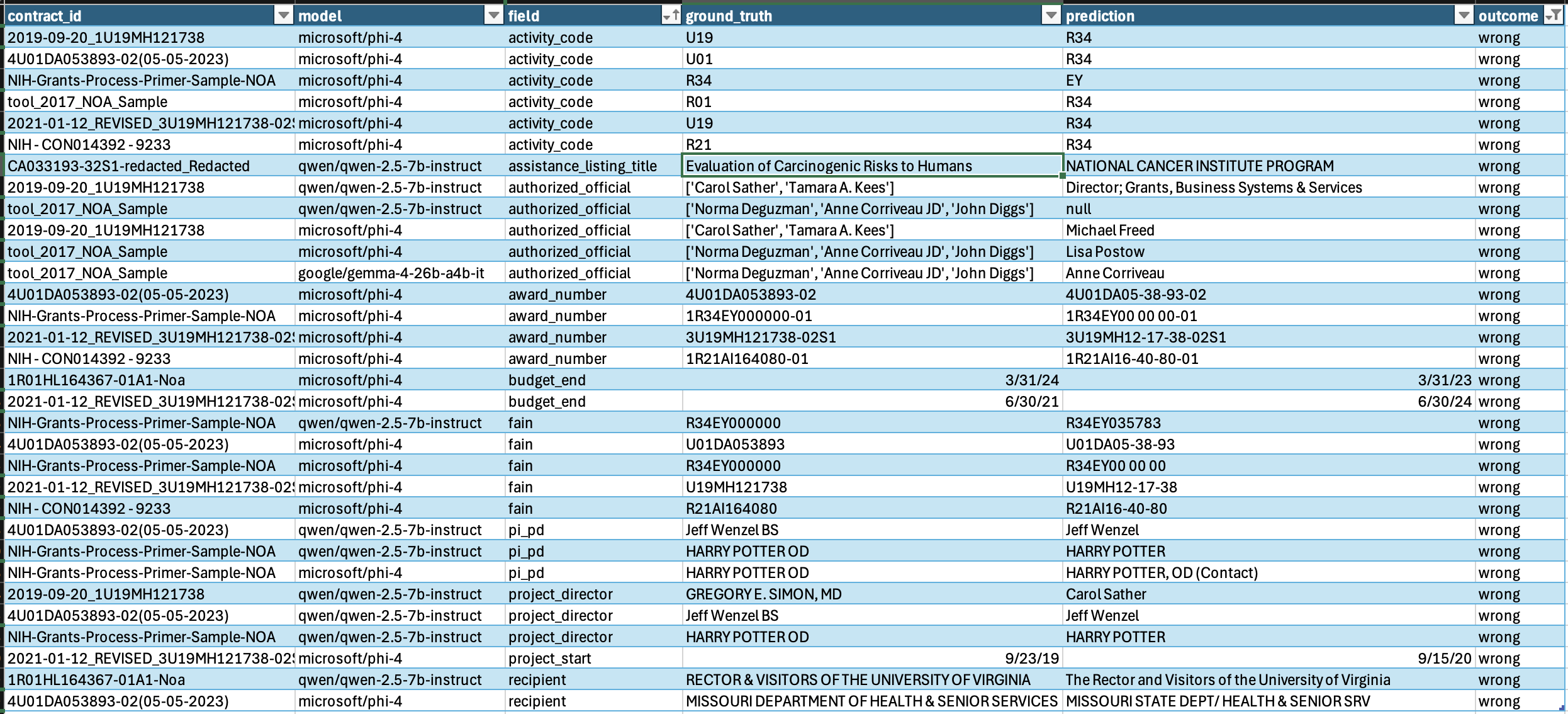
The most interesting failures were related to Phi 4 on activity_code and fields that returned a long string of numbers and letters like award_number and fain number. The activity code is a short alphanumeric label that classifies the grant with numbers like R01, U19, R21, and so on. Every other model in the lineup got it 9/9. Phi 4 got it for just 3/9 contracts. Of the six contracts it missed, it returned R34 on every single one.
On four awards, the Phi 4 model returned the award number with extra dashes inserted into the digits, like it was formatting a phone number or something. 1R01HL164367-01A1 came back as 1R01HL16-43-67-01A1. R21AI164080 came back as R21AI16-40-80. Eight of its 21 wrongs are this single formatting bug. Not a content miss. A formatting preference the model couldn't drop.
Those are the kind of model-specific failure modes you only see by grading each field on each award document that would be used in real workflows, and once you see it, you have actual information to point you in the right direction.
Here's the full list of wrong answers from the models to compare.
Model and Laptop Math -- Why model size matters for local AI
Here's some background on why the model sizes selected for this experiment were at the size they were. A rough way to estimate the amount of memory a model will occupy on a machine is:
model memory ≈ number of parameters × bytes per parameterCommon bit precision for models (bytes per parameter) are:
FP16 / BF16: about 2 bytes per parameter
8-bit:       about 1 byte per parameter
4-bit:       about 0.5 bytes per parameter
It's worth noting that each step down in bit precision is a step down in model precision, another factor that can affect performance.
So a 7 billion parameter model is roughly:
7B × 2 bytes   ≈ 14 GB at FP16
7B × 1 byte    ≈ 7 GB at 8-bit
7B × 0.5 bytes ≈ 3.5 GB at 4-bit
That only includes the model weights. Running the model (called inference) also needs extra memory for the runtime, operating system, context window, cache, prompt text, and overhead. A safer planning estimate is:
practical memory needed ≈ model weights + 25% to 50% processing overheadThat overhead matters because extraction work often uses long prompts of PDF text, schema instructions, field descriptions, and examples. A model can technically fit in memory and still struggle if the document context is long.
What this means on real hardware
Given the above requirements, I asked ChatGPT to research what this means for different levels of hardware.
| Hardware tier | Example machine | Relevant memory | What it can plausibly run locally |
|---|---|---|---|
| Professional Windows laptop | Dell Pro 14 Plus / similar business laptop | 16–32 GB system memory. | Good fit for small 3B–7B models, usually quantized. A 7B or 9B model may run, but performance and document length may be limiting. |
| Higher-end Windows mobile workstation | Lenovo ThinkPad P16 Gen 3 or Dell Pro Max workstation-class laptop | Lenovo lists up to 128 GB ECC; Dell Pro Max 16 Plus includes up to 64 GB. | Better fit for 7B–14B quantized models, and possibly larger models depending on GPU VRAM and whether inference can use system RAM. |
| Professional Mac laptop | MacBook Pro with M4 Pro / M5 Pro class chip | 24–64 GB unified memory. | Very practical for 7B–14B quantized local models. Unified memory helps because CPU and GPU share the same memory pool, but speed still depends on model size and context length. |
| High-end Mac laptop | MacBook Pro with M4 Max / M5 Max class chip | Up to 128 GB unified memory. | Can handle substantially larger quantized models, potentially including 27B–70B class models depending on quantization and context length. This is a serious local AI development machine, but not cheap. |
| Enterprise NVIDIA workstation | NVIDIA DGX Station GB300-class system | NVIDIA describes 748 GB of coherent memory and up to 20 petaFLOPS of AI compute. | This is no longer “laptop local AI.” It is enterprise-grade local infrastructure. It can support much larger models and heavier workloads, but it belongs in a central IT or lab environment, not on an individual analyst’s desk. |
Lessons
The whole run took 84 seconds and cost $0.044. That's a very low number. Five models, ninety calls, four cents. The cost of running this kind of evaluation against your own documents and your own rubric is hugely informative and essentially costs nothing. The reason most people skip this step is because it takes domain knowledge and tedious work to develop a solid ground truth to test against. That part is the actual work now that Codex can set up a testing environment for you in a few minutes.
If you're an auditor, program manager, or oversight analyst thinking about putting an LLM into a real document workflow on sensitive data, the takeaway from this run is narrower than most marketing pages suggest. Three of the five models I tested hit 97% accuracy on this task using very clean PDF data. Picking among them is mostly a hardware and latency question, not an AI capability question.
For a real workflow, I would start by collecting 10 to 25 representative documents, building a small ground-truth file, grading field-level outputs, and looking closely at the error types. The goal is not to prove the model is perfect. The goal is to decide what role it can safely play: auto-fill in a downstream process, reviewer assistant, second-pass checker, or maybe only an aid for first drafts.